
ACA compliance platform
ACA compliance,
start to finish.
ACAChamp tracks employee eligibility, prepares 1095-B and 1095-C forms, and transmits directly to the IRS, so your team isn’t managing spreadsheets six weeks before the filing deadline.
1095-B + 1095-C
Forms
IRS AIR
Direct transmission
50+ FTE
ALE coverage
The problem
The deadline doesn’t move.
Your spreadsheets do.
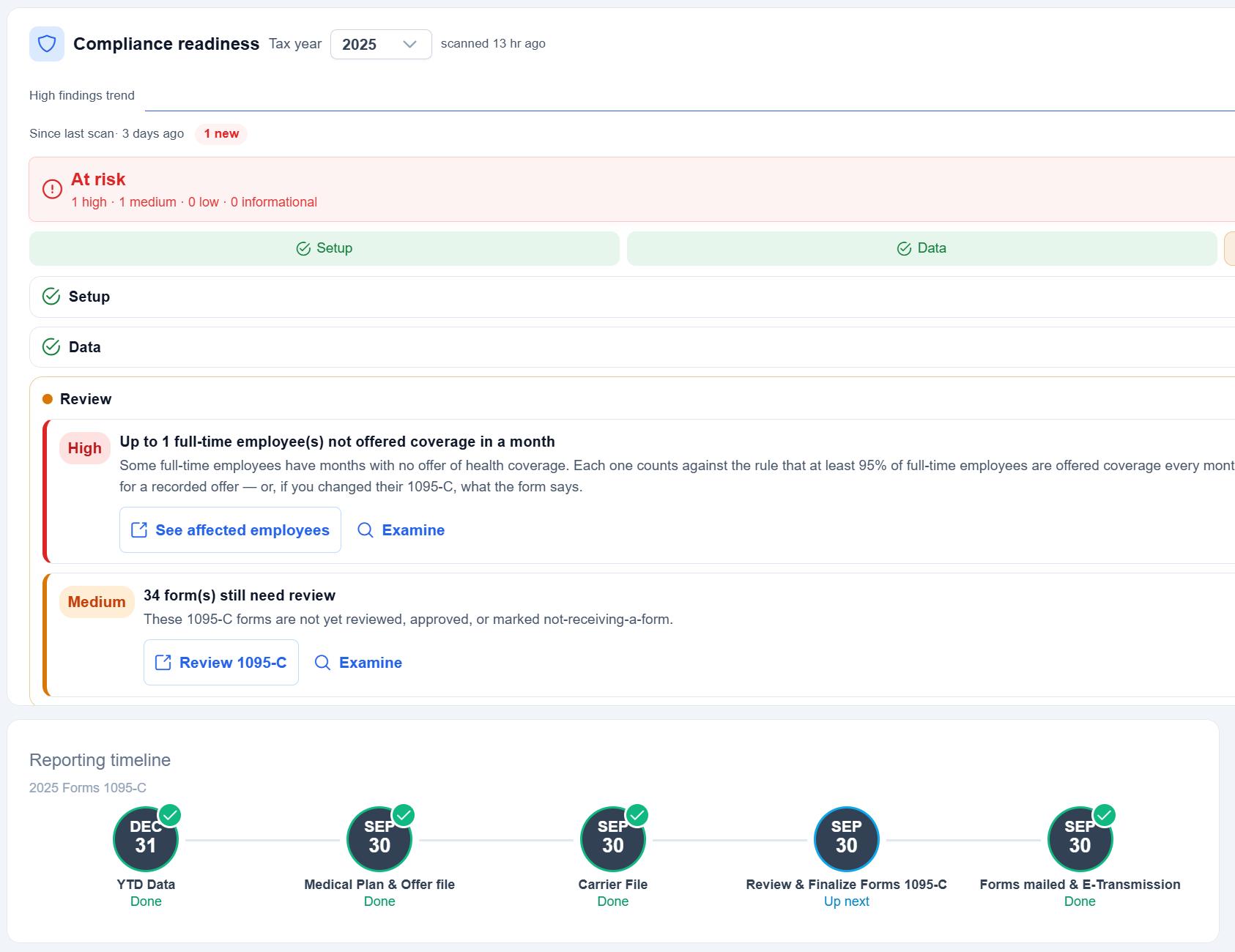
Every year, Applicable Large Employers face the same bind: months of payroll data to aggregate, eligibility determinations to document, IRS forms to generate for every covered employee, and a transmission deadline that doesn’t move.
Most HR teams handle this in spreadsheets stitched together from payroll exports and carrier files. When numbers don’t match, someone spends days tracking down the source.
Per-form penalty
$340
For a 200-person company, one error repeated on every 1095-C is a $68,000 filing penalty, and employee copies can be penalized separately.
50 employees
$17,000
200 employees
$68,000
500 employees
$170,000
Tax year 2025 forms filed in 2026: $340 per form (IRC 6721, Rev. Proc. 2024-40). Drops to $60 if corrected within 30 days or $130 by August 1. Separate from Section 4980H employer penalties.
What ACAChamp does
The spreadsheet workflow,
replaced.
A structured, guided process from data import through IRS transmission, built around the actual mechanics of ACA compliance, not generic HR.
01 · Eligibility
Track eligibility year-round.
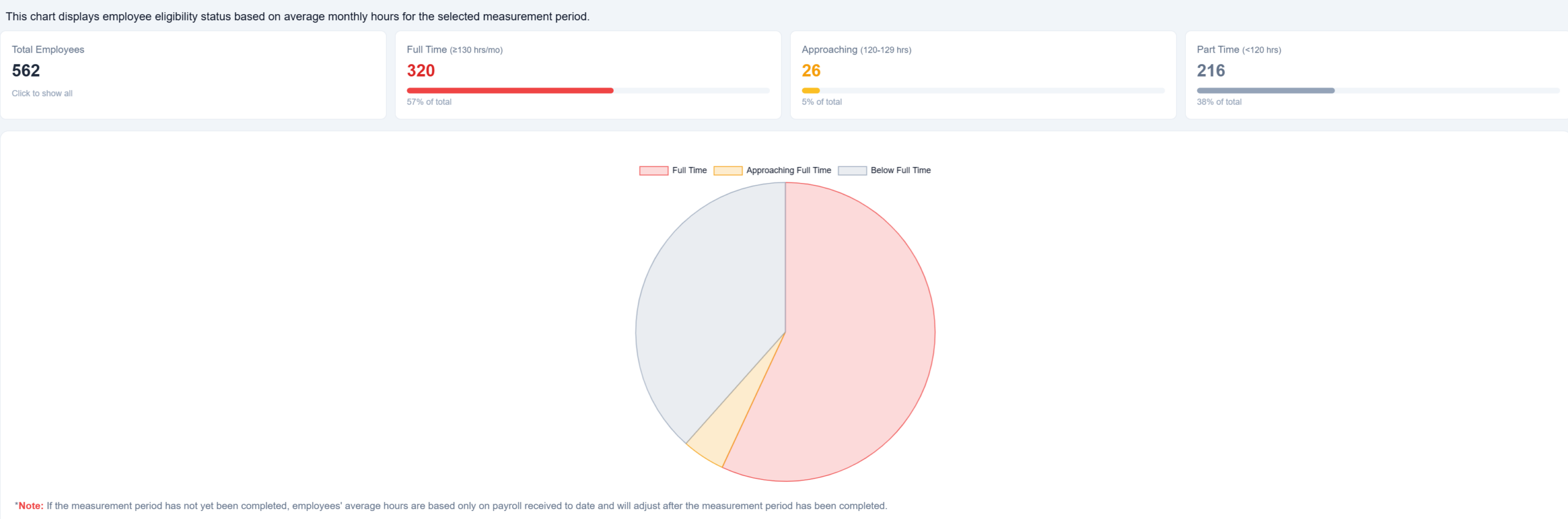
The measurement dashboard shows where every employee stands, based on average monthly hours from your payroll imports. ACAChamp flags anyone approaching full-time status before they cross the 130-hour threshold.
Eligibility status
IMP automation
Deadline alerts
02 · Data exchange
Import your data. Resolve the discrepancies.
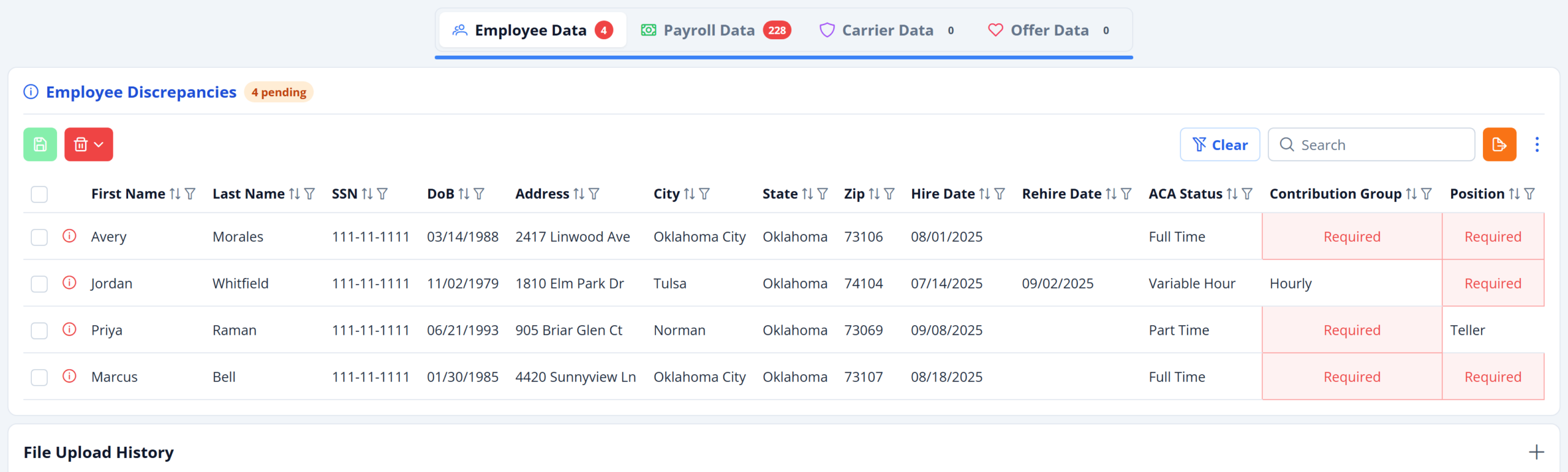
Upload payroll, carrier enrollment, and insurance offer files in CSV or Excel. The Data Exchange module identifies conflicts between your source systems and the database (duplicates, hours mismatches, coverage gaps, affordability variances) and presents them for resolution.
CSV / Excel
Bulk resolve
Full audit log
03 · Forms
Generate 1095-B and 1095-C forms at scale.
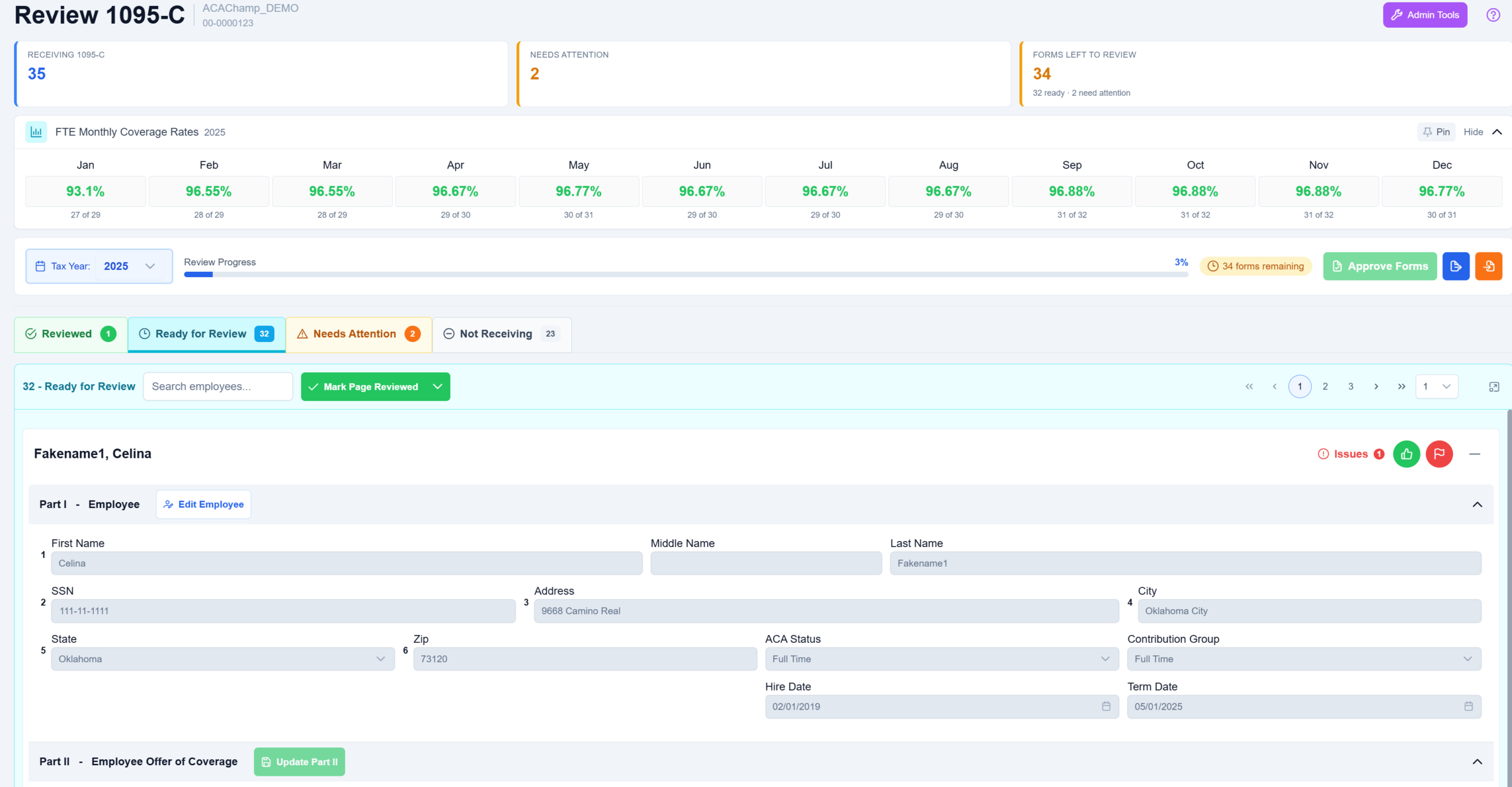
ACAChamp generates IRS-compliant forms from data already in the system. Line 14 offer codes, Line 15 employee share amounts, and Line 16 safe-harbor codes are calculated from your eligibility and plan data, with override capability for exceptions.
Line 14 / 15 / 16
Overrides logged
PDF distribution
04 · Transmission
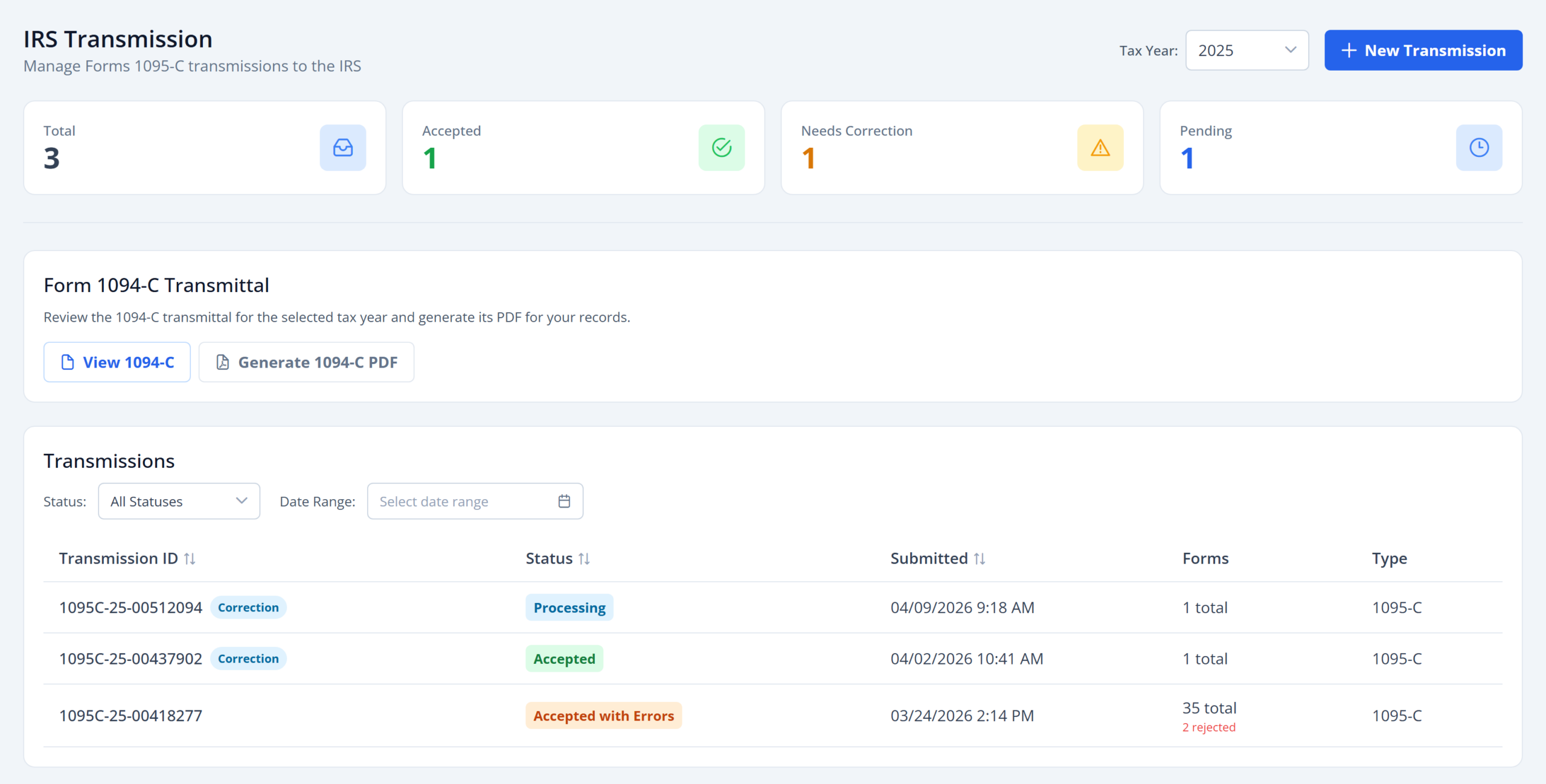
Transmit to the IRS, directly.
When forms are reviewed and approved, ACAChamp generates the XML package for the IRS AIR system and handles transmission. The 1094-B and 1094-C transmittal forms are included. Transmission status is tracked in the platform.
IRS AIR ready
1094-B / 1094-C
Receipt tracking
How it works
Eight steps.
One filing calendar.
ACAChamp’s workflow matches the actual ACA compliance calendar. Each step shows its completion status; admins can override the active step for out-of-order work or multi-year corrections.
Step 01
Configure employer
Set up employer information and EIN.
Step 02
Define medical plans
Plans, contribution groups, and offers.
Step 03
Import data
Payroll, carrier, and offer files in.
Step 04
Measurement Period
Configure the year-long evaluation window.
Step 05
Review forms
Verify 1095-C or 1095-B for every employee.
Step 06
Distribute forms
Download PDFs and deliver to employees.
Step 07
Transmit to the IRS
XML package sent to IRS AIR with receipt.
Step 08
Mark filing complete
Lock the tax year and archive the filing.
Service levels
Four configurations.
Pick what you need.
ACAChamp scales from eligibility tracking only to full-service compliance, with a dedicated tier for 1095-B filers.
Tracking
For employers handling their own filing, but who want accurate eligibility data year-round.
- Full measurement dashboard
- Payroll import + calculations
- New Hire & Eligibility reports
- CSV exports
Eligibility, no filing
Reporting
For employers with a separate eligibility process who need clean form output and direct IRS transmission.
- Carrier + offer records
- 1095-C form generation
- IRS AIR transmission
- 1094 transmittal included
Forms + transmission
Full platform
Tracking + Reporting
The full platform: eligibility, forms, discrepancy resolution, and IRS transmission in one place.
- Everything in Tracking
- Everything in Reporting
- Discrepancy resolution
- Multi-year corrections
Recommended
1095-B Only
For insurance carriers and self-insured non-ALEs filing 1095-B rather than 1095-C.
- 1095-B generation
- Covered-individual records
- 1094-B transmittal
- IRS AIR transmission
Carriers + non-ALE
Who it’s for
Built for employers who can’t afford a filing error.
Multi-entity organizations manage multiple employer records from a single account, with role-based access for consultants and internal staff.
Applicable Large Employers
50+ full-time equivalents required to file Form 1095-C annually.
Self-insured employers & carriers
Organizations filing Form 1095-B for self-funded health plans.
Educational institutions
Schools and universities with variable-hour faculty and staff.
HR & compliance teams
Benefits administrators responsible for ACA filing year-round.
Payroll service providers
Firms handling ACA compliance for a book of client employers.
Compliance consultants
Advisors managing multi-entity filings on behalf of clients.
Supporting features
Everything else you’d expect.
New Hire
Eligibility
Payroll
Reports built for ACA work
New Hire surfaces IMP end dates and initial status. Current Eligibility shows a real-time snapshot: measurement period, YTD hours, trending status, coverage enrollment. Payroll aggregates hours by employee, department, or period. All export to CSV.
2024
284 files
2025
291 files
2026
285 files
File cabinet
Generated PDFs, import files, and upload history stored centrally. Filter by employee, tax year, document type, or date. Batch download as ZIP. Archive and restore old files without permanent deletion.
AES-256
Azure AD B2C
Multi-tenant
Audit log
Security & isolation
Authentication via Azure AD B2C. Sensitive identifiers protected with AES encryption. Data isolated by employer in a multi-tenant architecture with full audit logging on every change.
Ready to see it?
Walk through your filing scenario.
Schedule a demo and we’ll cover your specifics, whether you’re an ALE filing 1095-C for the first time or a service provider managing a client book.